0. Brieflow <> Brieflow Analysis
Overview
Brieflow and brieflow-analysis are closely related repositories built together and, usually, both used for a screen analysis. We distinguish these repositories like so:
brieflow: code to process OPS data on a large scale
brieflow-analysis: notebooks, files, and scripts that are used during a brieflow run
Both of these work together to run modules for steps like preprocessing, SBS, phenotype, etc. Let’s take a closer look:
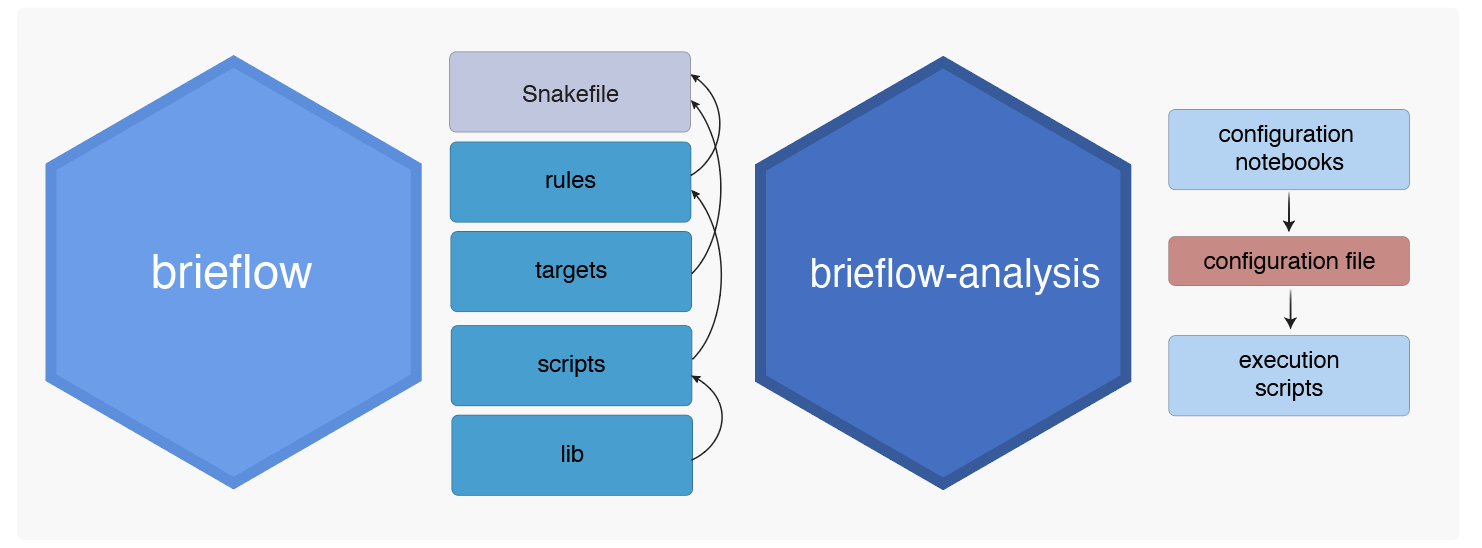
Brieflow
Components
Brieflow has the following components:
lib: Brieflow library code used for performing Brieflow processing. Organized into module-specific, shared, and external code.
rules: Snakemake rule files for each module. Used to organize processses within each module with inputs, outputs, parameters, and script file location.
scripts: Python script files for processes called by rules. Organized into module-specific and shared code.
targets: Snakemake files used to define inputs and their mappings for each module
Snakefile: Main Snakefile used to call modules.
One of the simplest examples for this is read calling during the SBS step. We can approach this from a top -> down perspective to understand what is going on.
In the main Snakefile we tell Snakemake to include the rules and targets for the entire SBS module:
if "sbs" in config and len(sbs_wildcard_combos) > 0:

    # Include target and rule files
    include: "targets/sbs.smk"
    include: "rules/sbs.smk"
Snakemake first looks at the targets to see what we want produced. The read calling output file is specified here:
"call_reads": [
    SBS_FP
    / "tsvs"
    / get_filename(
        {"plate": "{plate}", "well": "{well}", "tile": "{tile}"}, "reads", "tsv"
    ),
],
Snakemake then looks through the rules to see what needs to be run to produce this file. We need to run the following rule to get the
call_readsoutput:
rule call_reads:
    input:
        SBS_OUTPUTS["extract_bases"],
        SBS_OUTPUTS["find_peaks"],
    output:
        SBS_OUTPUTS_MAPPED["call_reads"],
    params:
        call_reads_method=config["sbs"]["call_reads_method"]
    script:
        "../scripts/sbs/call_reads.py"
This process takes 2 inputs, produces 1 output, and passes one param to the script to do so. 4) Snakemake loads the script for this rule:
from lib.sbs.call_reads import call_reads

# load bases data
bases_data = pd.read_csv(snakemake.input[0], sep="\t")

# load peaks data
peaks_data = imread(snakemake.input[1])

# call reads
reads_data = call_reads(
    bases_data=bases_data,
    peaks_data=peaks_data,
    method=snakemake.params.call_reads_method,
)

# save reads data
reads_data.to_csv(snakemake.output[0], index=False, sep="\t")
This is a very simple script that loads data, calls a function, and saves data. 5) Finally, snakemake accesses the library code that we use here:
def call_reads(
    bases_data,
    peaks_data=None,
    correction_only_in_cells=True,
    normalize_bases_first=True,
    method="median",
):
    """Call reads for in situ sequencing data.

    Call reads by compensating for channel cross-talk and calling the base
    with the highest corrected intensity for each cycle.

    Args:
    bases_data : pandas DataFrame
        Table of base intensity for all candidate reads, output of extract_bases.
...
Project Structure
Brieflow is built on top of Snakemake. We follow the Snakemake structure guidelines with some exceptions. The Brieflow project structure is as follows:
workflow/
├── lib/ - Brieflow library code used for performing Brieflow processing. Organized into module-specific, shared, and external code.
├── rules/ - Snakemake rule files for each module. Used to organize processses within each module with inputs, outputs, parameters, and script file location.
├── scripts/ - Python script files for processes called by modules. Organized into module-specific and shared code.
├── targets/ - Snakemake files used to define inputs and their mappings for each module.
└── Snakefile - Main Snakefile used to call modules.
Brieflow runs as follows:
A user configure parameters in Jupyter notebooks to use the Brieflow library code correctly for their data.
A user runs the main Snakefile with bash scripts (locally or on an HPC).
The main Snakefile calls module-specific snakemake files with rules for each process.
Each process rule calls a script.
Scripts use the Brieflow library code to transform the input files defined in targets into the output files defined in targets.
Brieflow Analysis
The analysis repo holds the files neccessary for configuring and running brieflow. In the case of the read calling function above we:
Run the 2.configure_sbs_params.ipynb notebook.
Set the
CALL_READS_METHODparameter in this notebook.
# Define parameters for extracting bases
CALL_READS_METHOD = "median"
Save this parameter to the config file at the end of the notebook:
config["sbs"] = {
    ...
    "call_reads_method": CALL_READS_METHOD,
    ...
}

# Write the updated configuration back with markdown-style comments
with open(CONFIG_FILE_PATH, "w") as config_file:
    # Write the introductory markdown-style comments
    config_file.write(CONFIG_FILE_HEADER)

    # Dump the updated YAML structure, keeping markdown comments for sections
    yaml.dump(config, config_file, default_flow_style=False, sort_keys=False)
This parameter gets passed to the snakemake rule during a run (see above)
rule call_reads:
...
    params:
        call_reads_method=config["sbs"]["call_reads_method"]
...
Reproducibility and Modularity
Brieflow and brieflow-analysis are built for reproducibility and modularity. This setup enables researchers to
work on a specific process within brieflow (ex, make siloed changes to
call_reads)develop versions of brieflow that can be used across multiple brieflow-analysis repositories (ex, a
custom_screenbranch for brieflow can be used in multiple brieflow-analysis repos)track exact differences between the
mainbranch of brieflow and a custom branchhost an entire screen analysis on GitHub for reproducibility